Features Guide Devices Pricing Conservation Support
← Workouts and Training

7.1.1 · Workouts and Training

Start, Screen and Summary

Start and end, the workout screen, calories and the trip summary.

Start and end: What happens from entrance to exit, even after a crash.
Start the workout from the project's Workout tab. A caving workout walks you through the entrance GPS, north and the datum first (Calibration). Record as many Cave Lines and Hike Lines as you like in one workout. When you're done, tap End, then Record to Apple Health, or Discard workout to leave nothing there. The trip stays in SpeleoMap either way. Swiped SpeleoMap closed mid-workout? It ends and saves the workout to Apple Health, and it's in your Workouts list the next time you open the Workout tab (delete it there if you like). After a crash the same happens on the next launch, ended at the last moment the app was running. Ending the workout also ends any Cave Line or tape still recording.

You need a Caving or Hiking workout running before you can record a Cave Line or Hike Line. A hiking workout locks the trailhead and north first.

The workout screen: Know what each number is based on.
Distance and pace come from your line (Cave Line underground, Hike Line GPS on the trail). Depth is the lowest point below where you started, from the barometer, so start at the entrance. Steps, cadence and heart rate come from Apple Health; heart rate is best with an Apple Watch. Pick the boxes in Workout settings. With no workout running the tab lists your workouts instead, and a bar at the bottom shows Apple Health and your latest heart rate with the time it was measured.

With no line recording, distance is Apple's step count and climb and drop come from the barometer. Calories are SpeleoMap's on caving and rope workouts when your weight is set, otherwise Apple's. Tap a past workout to open its summary, or Manage to delete.

Caving calories: Calorie counts that fit real caving.
Apple's estimate assumes walking. Caving isn't walking, so SpeleoMap works it out from what you're doing: still, walking, stooping, crawling, climbing or descending. Stow Mode gives the posture and the barometer tells up from down. It needs your weight in Profile settings; your weight never leaves the phone.

Rope climbing counts the height you gain and how fast, lifting your weight plus your gear weight. Leave your weight empty and caving workouts use Apple's estimate.

Activity types: What shows up in the Health app.
  • Caving: saved as a walking workout, the closest iOS has.
  • Hiking: saved as hiking, with the GPS route if you want it (Hike settings).
  • Training: SRT, running and crawling, see SRT, Running, Crawling.
Trip summary: Your trip at a glance, right after saving.
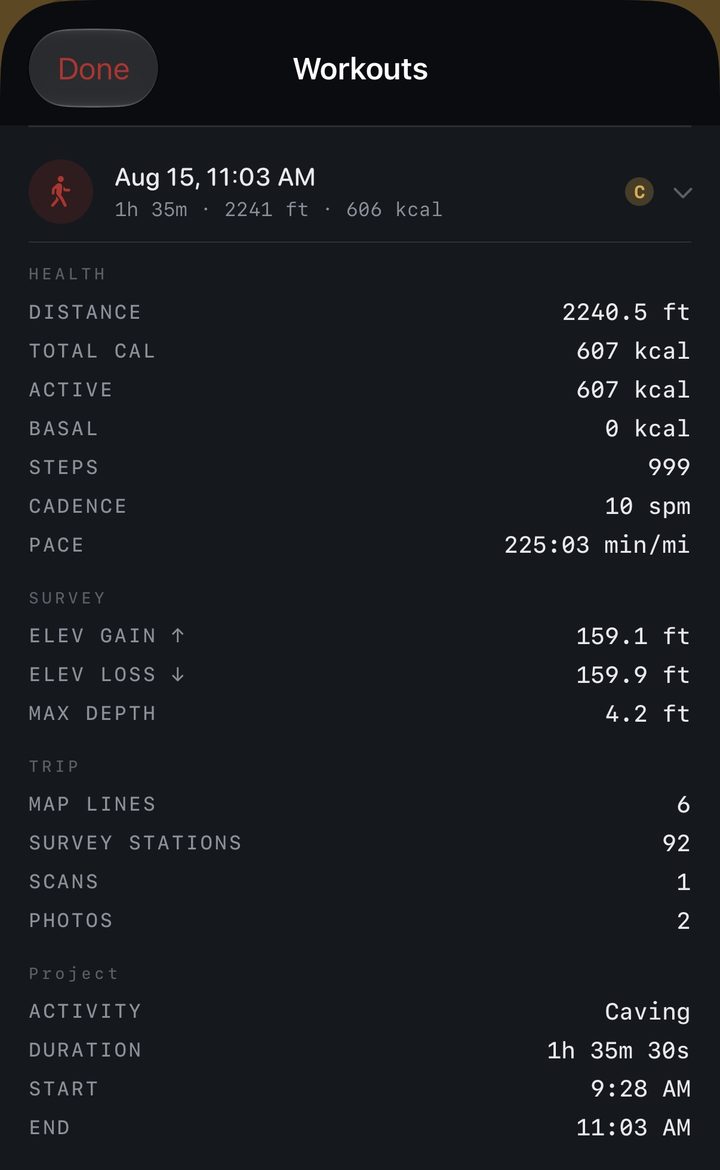
Trip summary
Saving opens the Trip summary: time, distance, calories, depth, climb, and, on caving trips, a Movement bar for walking, stooping, crawling, swimming and rope. VS LAST TRIP compares with your previous trip of the same kind in the same project. Lifetime numbers and Badges are in Settings, Profile, Badges.

Badges earned on the trip show at the top, and the same summary opens when you tap a trip in the workout list.

Mentioned in: 9.1 Profile · 9.13 Workout

← 6.6 Save Measurements and Notes7.1.2 Heart Rate, Depth and Elevation →